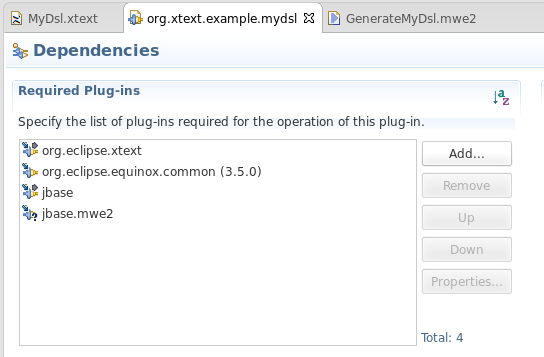
Create an Xtext project, you can leave the defaults for names, e.g., org.xtext.example.mydsl.
Open the MANIFEST.MF of the main project and
Save the file.
Change the Xtext grammar, MyDsl.xtext, making the grammar inherit from jbase.Jbase:
grammar org.xtext.example.mydsl.MyDsl with jbase.Jbase
generate myDsl "http://www.xtext.org/example/mydsl/MyDsl"
Model:
greetings+=Greeting*;
Greeting:
'Hello' name=ID '!';
Tweak the MWE2 workflow as detailed in the next sections, making sure you read the one related to the version of Xtext's generator you are using.
Open the MWE2 workflow, GenerateMyDsl.mwe2 and
language = StandardLanguage {
name = "org.xtext.example.mydsl.MyDsl"
fileExtensions = "mydsl"
// new added lines to enable Jbase
referencedResource = "platform:/resource/jbase/model/custom/Jbase.genmodel"
xbaseSupport = jbase.mwe2.generator.JbaseGeneratorFragment2 {}
Run the GenerateMyDsl.mwe2 just to make sure that the Xtext artifacts are correctly generated and that Jbase dependencies are added to the ui project.
SKIP THIS SECTION IF YOU ARE USING THE NEW XTEXT GENERATOR (i.e., the one described in section NewGenerator).
Open the MWE2 workflow, GenerateMyDsl.mwe2 and
bean = StandaloneSetup {
scanClassPath = true
platformUri = "${runtimeProject}/.."
registerGeneratedEPackage = "org.eclipse.xtext.xbase.XbasePackage"
registerGenModelFile = "platform:/resource/org.eclipse.xtext.xbase/model/Xbase.genmodel"
// In order to inherit from Jbase, add these two lines:
registerGeneratedEPackage = "jbase.jbase.JbasePackage"
registerGenModelFile = "platform:/resource/jbase/model/custom/Jbase.genmodel"
}
// generates the required bindings only if the grammar inherits from Xbase
// fragment = xbase.XbaseGeneratorFragment auto-inject {}
fragment = jbase.mwe2.generator.JbaseGeneratorFragment auto-inject {}
Run the GenerateMyDsl.mwe2 just to make sure that the Xtext artifacts are correctly generated and that Jbase dependencies are added to the ui project.
Let's change the grammar as follows:
grammar org.xtext.example.mydsl.MyDsl with jbase.Jbase
generate myDsl "http://www.xtext.org/example/mydsl/MyDsl"
Model:
// import section (automatic imports)
importSection=XImportSection?
greetings+=Greeting*;
Greeting:
// each greeting will have a Java block
'Hello' name=ID body=XBlockExpression;
Now run the mwe2 workflow again, to re-generate Xtext artefacts.
Please, merge the plugin.xml and the plugin.xml_gen in the UI project.
Implement the Jvm model inferrer as follows:
package org.xtext.example.mydsl.jvmmodel
import com.google.inject.Inject
import org.eclipse.xtext.xbase.jvmmodel.AbstractModelInferrer
import org.eclipse.xtext.xbase.jvmmodel.IJvmDeclaredTypeAcceptor
import org.eclipse.xtext.xbase.jvmmodel.JvmTypesBuilder
import org.xtext.example.mydsl.myDsl.Model
class MyDslJvmModelInferrer extends AbstractModelInferrer {
@Inject extension JvmTypesBuilder
def dispatch void infer(Model element, IJvmDeclaredTypeAcceptor acceptor, boolean isPreIndexingPhase) {
for (greeting : element.greetings) {
acceptor.accept(element.toClass("my.company." + greeting.name)) [
members += greeting.toMethod("hello" + greeting.name, inferredType) [
body = greeting.body
]
]
}
}
}
Thus, for each Hello element, we create a Java class with the name of the element (in the package "my.company") with a public method with name "hello" + the name of the Hello element, and associate the block expression to the body of the method. Note that the return type of the method will be inferred automatically from the contents of the block expression.
If you want to manually test your DSL, run another Eclipse instance (Xtext should have generated a launch configuration in your projects, if you started with an empty workspace); in the new instance, create a Plug-in project, and add a dependency to the bundle org.eclipse.xtext.xbase.lib. In the src folder create a new file with extension .mydsl, e.g., example.mydsl; when the dialog pop-ups, accept to add the Xtext nature to the project.
Try and add some contents to the file; remember that in the codeblock you must use Java syntax, NOT Xbase syntax.
Hello Example {
return "aString";
}
You get no error, and, on Save, a file my/company/Example.java will be created on the src-gen folder, with a method helloExample inferred to return a String.
We try to mimic JDT compilation errors; for instance, remove the terminating ; in the return statement and you will get a compilation error of the shape: Syntax error, insert ";" to complete Statement.
Further explore the DSL, and add another Hello block to the end of the file, showing Java variable syntax (content assist will automatically add imports for List and ArrayList; or use "Organize Imports" menu):
Hello ListExample {
final List<String> listOfStrings = new ArrayList<String>();
listOfStrings.add("my string");
listOfStrings.add(new Example().helloExample());
return listOfStrings;
}
Note that you have access to the Java method of the previous Hello element.
You also have the Java array syntax available:
Hello ArrayExample {
List<String> list = new ListExample().helloListExample();
String[] a = new String[list.size()];
for (int i = 0; i < a.length; i++) {
a[i] = list.get(i);
}
return a;
}
We now see how to turn an existing Xbase-DSL to use Jbase. We will use the well-known Xtext/Xbase Domainmodel example.
First of all, import this example into the workspace: File => New => Example... then navigate to the "Xtext Examples" category and choose "Xtext Domain-Model Example", this will materialize into your workspace the standard Xtext Domainmodel example's three projects.
First of all, open org.eclipse.xtext.example.domainmodel's MANIFEST.MF file and
Save the file.
Modify the GenerateDomainmodelLanguage.mwe2 as shown in First Tutorial:
bean = StandaloneSetup {
scanClassPath = true
registerGeneratedEPackage = "org.eclipse.xtext.xbase.XbasePackage"
registerGenModelFile = "platform:/resource/org.eclipse.xtext.xbase/model/Xbase.genmodel"
registerGenModelFile = "platform:/resource/org.eclipse.xtext.common.types/model/JavaVMTypes.genmodel"
// In order to inherit from Jbase, add these two lines:
registerGeneratedEPackage = "jbase.jbase.JbasePackage"
registerGenModelFile = "platform:/resource/jbase/model/custom/Jbase.genmodel"
}
// generates the required bindings only if the grammar inherits from Xbase
// fragment = xbase.XbaseGeneratorFragment auto-inject {}
fragment = jbase.mwe2.generator.JbaseGeneratorFragment auto-inject {}
Make the Domainmodel.xtext grammar inherit from jbase.Jbase:
grammar org.eclipse.xtext.example.domainmodel.Domainmodel with jbase.Jbase
Now run the mwe2 workflow, to re-generate Xtext artefacts.
The DomainmodelJavaValidator should be modified so that it extends JbaseValidator instead of XbaseValidator, so that it will use our Jbase custom Xbase validator.
There is no need to change the model inferrer, since the runtime model of Jbase is also a valid runtime model of Xbase.
If you want to manually test these modifications to the Domainmodel, run another Eclipse instance (Xtext should have generated a launch configuration in your projects, if you started with an empty workspace); in the new instance, create a Plug-in project, and add a dependency to the bundle org.eclipse.xtext.xbase.lib. In the src folder create a new file with extension .dmodel, e.g., example.dmodel; when the dialog pop-ups, accept to add the Xtext nature to the project.
Here's an example of what you can write with the Domainmodel example that uses Jbase instead of Xbase. Note the Java variable syntax, array access syntax and formal parameters, which are, as in Java, non-final by default (so they can be assigned):
import java.util.List;
package my.model {
entity Person {
name : String
firstName : String
friends : List<Person>
address : Address
op getFullName() : String {
return firstName + " " + name;
}
op getFriendsArray() : Person[] {
Person[] a = new Person[friends.size()];
int i = 0;
for (Person friend : friends) {
a[i++] = friend;
}
return a;
}
op m(int i) {
// parameters are NON-final by default, as in Java
i = 10;
}
}
entity Address {
street : String
zip : String
city : String
}
}
You may also want to modify the DomainmodelFormatter.xtend so that it extends JbaseFormatter instead of XbaseFormatter, so that automatic formatting will work for our Java expressions.
If you want to run the Domainmodel Junit test suite, you first need to update the inputs that are used in those tests, so that they respect the Java syntax: imports and statements must be terminated with a semicolon, method invocations must have parenthesis, etc. Moreover, the original test XbaseIntegrationTest will not work (since it relies on Xbase syntax). Finally, some tests should be removed completely, since they use features/mechanisms of Xbase that are not supported in Jbase, such as, e.g., static extension methods. (The modified domainmodel example can be found in the Git repository of Jbase).